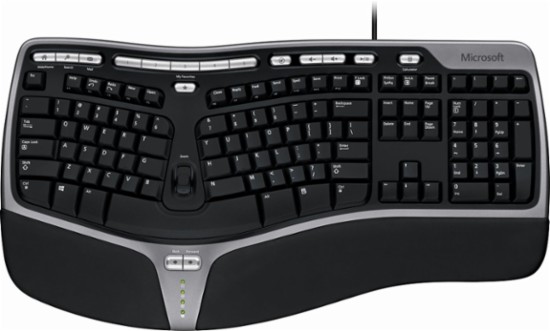
Diane’s sister, Carol, complained: “The letters on the keys of this keyboard are worn off!” Art Scott, during his last visit to North Tonawanda, also noticed the keys with worn-off letters. But Art’s complaint was the ergonomic design of my Microsoft Natural Ergonomic 4000 Keyboard. “How do you type with this thing?” Art demanded.
Actually, I type very well on my Microsoft Natural Ergonomic 4000 Keyboard (I know where the keys are!). When I was teaching at the College, I spent hours typing on the computer answering student emails (thousands!), typing up exams (hundreds), and filling out bureaucratic paperwork (tons!). Using conventional keyboards gave me a painful knot in the base of my neck. I read some reviews about ergonomic keyboards and bought the Microsoft Natural Ergonomic 4000 Keyboard. It was love at first type! I could type for hours and not get that pain in my neck.
I requested a Microsoft Natural Ergonomic 4000 Keyboard for my College computer, too. If you’re tired of neck and back pain from using a conventional keyboard, here’s the solution! Yesterday, the “P” key stopped working so I quickly bought a new Microsoft Natural Ergonomic 4000 Keyboard and I’m typing this post on the new keyboard right now! What kind of keyboard do you use? GRADE: A